v0.6.4 2026-11-20 PATCH
A ROTATING SYNTHWAVE SOUNDTRACK

The soundtrack now changes as you play: three synthwave tracks take turns instead of one track looping all game.

  • Three new tracks — Electric, Cosmic and Future play in turn, each for about two and a half minutes, fading out and back in between tracks.
  • No gap in the loops — each track repeats without a drop-out or click.
  • Same volume as before — the three tracks are levelled to the old soundtrack, so the mix does not jump when you switch on this version.
v0.6.3 2026-11-19 PATCH
PAUSE BUTTON AND QUICKER GOALS

You can now pause the game with one button, and the goal cards are easier to skim.

  • Pause button — a ⏸ button in the top bar (or the Space bar) stops the city and the music, and tapping it again carries on at the speed you had.
  • Goals stated plainly — each goal card now says just the goal ("Reach ¢5/s"). Short tips on how sit underneath, and you can switch them off with Goal tips in Settings.
  • People go into buildings — now and then a walker steps off the pavement, disappears into a building, and comes back out a few seconds later.
  • Goals panel in tabs — the goals panel is split into Now, Landmark and Side tabs, so it is one short page at a time instead of one tall scroll.
  • Tidier top bar — pause and speed are now one joined control, net income sits inside the credits chip (the separate NET chip is gone), and the SAVE button moved into the system panel (▤ → Save now). The game still autosaves every 30 seconds.
  • Rename your city by clicking its name — click the city name at the top to change it.
v0.6.2 2026-10-30 PATCH
DIRTIER STREETS, BRIGHTER WINDOWS

A second pass on the gritty look: the streets get dirtier, while lit windows glow properly again.

  • Lit windows are bright again — fewer rooms are lit than before 0.6.1, but the ones that are glow warm and clear instead of looking like muddy paint.
  • Lived-in pavement — sidewalks and the paving round buildings are a little darker, with oil and water stains you can see from the normal camera.
  • No more gold towers — clinics and hospitals are weathered concrete instead of white tile that turned yellow in the sunset, and buildings take on a softer colour cast from street to street.
  • Softer greenery — hologram trees and parks are a step calmer than the shop signs but still green and glowing, lawns look lived-in, and Data Totems light only their top rings.
  • Less neon trim — blocks of flats lose their bright blue full-height light strip, and capsule hotels are grey steel instead of blue, keeping their pink HOTEL sign.
  • Rain stains — dark streaks now run down from ledges and window sills.
v0.6.1 2026-10-30 PATCH
GRITTIER BUILDINGS AND PROPER SIDEWALKS

The city has a grittier industrial look, with restrained neon and proper road sidewalks.

  • Grittier buildings — dark steel, smoked glass and weathered facades replace the oversized green and purple surfaces. Fewer glowing bands and softer terrain colours let signs and occupied rooms stand out.
  • Paving stays where you build — placing a building only paves its own footprint. Empty gaps between buildings stay unpaved.
  • Detailed pavement — concrete slabs have recessed joints, worn edges, fine grain and subtle stains, with darker raised kerbs.
  • People stay on sidewalks — walkers follow the pavement around corners and junctions, away from the traffic lanes.
v0.6.0 2026-10-29 MINOR
HIGHLIGHTS
  • Buildings in proper scale — windows and floors are bigger, so towers feel like real buildings next to the cars and people, and people are a little taller.
  • Sidewalks round buildings — every building now stands in a paved walkway with a kerb, and the widest towers are a little narrower, so they no longer look glued to the road.
  • Rain and night streets — in rain, roads turn glossy so lamps, windows and neon streak across the asphalt, and people put up umbrellas. After dark, street lamps throw a faint shaft of light, cars light the road ahead, and wet roads catch their red tail lights.
  • More depth — soft shading where towers meet the street, a little more light and shade at night, paler walkways that stand out from the ground, and crisper shadows.
  • New Soft shading & haze setting — turn the new shading and lamp haze off in Settings. If the game runs slowly on your device it switches them off by itself, and you can switch them back on.
  • Cleaner sound — busy moments no longer crackle, crickets sing in the parks at night, a distant siren sometimes passes, and the game goes quiet and stops using power when you switch tabs.
  • Your analytics choice — switch page view, gameplay event and play-time collection off or on in Settings. Your choice is remembered separately for the website and itch in this browser.
v0.5.0 2026-10-27 MINOR
HIGHLIGHTS
  • Compact city panel — advice, Stats, Budget and Buildings share tabs, leaving more of the map visible.
  • Main Menu — save and pause your city, then resume when you are ready.
  • New City within reach — start over from the city panel or Main Menu, with a confirmation before any progress is erased.
  • Shorter, corrected manual — quick controls and compact tables replace long explanations. Catalog stats distinguish homes from appeal, with refreshed building previews and city screenshots.
v0.4.1 2026-10-27 PATCH
HIGHLIGHTS
  • Roads leave empty land alone — an empty tile beside a road used to turn into paving when a building stood on its other side. Now paving only fills a gap between two buildings
  • Shorter Needs help — tapping Needs in the top bar now gives one short line instead of a paragraph
v0.4.0 2026-10-27 MINOR
HIGHLIGHTS
  • A real city — paved streets, lawns, plazas, a living lake, hologram groves in parks, houses and shops in different colours, and sounds from where things are
  • A campaign with a story — each world has its own premise and ending, and a “Show me” button points to your next step
  • Homes grow your city — population is now the people living in the homes you build, like in other city builders. Homes near a clinic fill completely, fire stations put fires out, busy streets jam until you upgrade them to avenues, and eight map views show it all, as in Cities: Skylines
  • A fairer game — an easy start that ramps up, no getting stuck broke, maps that matter, and a campaign of about 15 to 20 minutes
  • Easier to play — bigger key numbers, tap any game word for its meaning, buildings without a road go dark with a warning, faster menus, and it plays offline from your Home Screen
  • Challenge a friend — after a win, send a link to your map and your time to beat
EVERYTHING NEW, IN DETAIL
VISUALS
  • Cyberpunk, not countryside — park trees are now hologram trees: a neon canopy that you can see through, on a metal pole. The pine trees in the Park Bench are gone too. People are about a third smaller and slimmer, with smaller heads, and some wear a glowing visor. Cars are a little smaller, so a person comes up to about a car's roof
  • Panels you can read at a glance — a building's panel now reads top to bottom: name and a status badge, what it produces in large type (what it draws is a small line under it), upkeep, then the upgrade with its perk. A building with no road says why in one boxed line instead of repeating OFFLINE three times. The Goals panel shows progress dots and the next step instead of a list, and finished landmarks shrink to one line. Advisor lines are a few words (“4 buildings with no road”), the Budget's net balance is the biggest row, and the Buildings tray's close button sits at the right on a phone. The road panel has one main button (Avenue) and a quieter one for the whole stretch, a story card no longer repeats “What this means” on each answer, an empty tile says one line instead of a paragraph, and Stats puts the city's name and size in a footer, with shorter charts and a bold net income row. The placement bar shows the price large and a short hint, with Confirm as the one solid button, and SAVE is a plain button because the game autosaves. The rotate buttons are one rounded control matching Confirm and Cancel in height, and road mode loses its label and long hint. The world pick leads with the biome name and its one-line pitch, and all four choices fit on a phone screen. The victory and defeat screens no longer get a second share pop-up on top: the victory screen’s own button says “Challenge a friend” with the time to beat, and the defeat screen has a Share link. The world pick lost its duplicate RANDOM button
  • Fewer menus, less text — a ◎ button in the top bar opens the map views. Stats, Budget and Buildings share one row of tabs instead of three separate panels. Overview no longer repeats the numbers in the top bar, and its panel buttons sit in one row on a phone. The Goals panel lost its briefings, and each landmark goal is a line of numbers, like “20,000 people · CIT 60+”. A building's panel shows a perk's effect instead of a story, and drops the quote
  • Menus you can read at a glance — the numbers that decide a purchase (cost, build time, income) are now big, highlighted tiles at the top of the build menu instead of small chips at the bottom. The second row of buildings no longer gets cut off on a laptop screen, so every price is visible. A building's panel leads with its status, upkeep and output and no longer hides them behind its own buttons. Dim text is lighter, small labels are bigger, building names are easier to read, and on a phone the four buttons at the bottom now fit properly. The campaign card steps aside instead of covering the build menu or the system panel
  • Phone dialog only on phones — a short laptop browser window no longer gets the “best in landscape” phone dialog, and a phone that is already sideways is shown touch tips instead of being told to turn it sideways
  • Upgrade and Demolish work on a sideways phone — in a building's panel on a phone held in landscape, both buttons sat below the panel on the map and could not be tapped. They are inside the panel again
  • A story around the campaign — each world now opens with a few lines on why you are there, a one-line pitch on the world pick screen, and its own ending: what the last landmark means and who has something to say about it (Dust in the badlands, Director Chen in the harbour, Ghost_404 in the canyons). The campaign tasks now come from City Hall's Directive Office, with a short briefing for each chapter in the Goals panel
  • The union organiser is one person again — the organiser's text called them “Marta” and “she” while the portrait and the rest of the game show a man. He is now Mikhail Volkov throughout, and when you have him removed the unrest message names him instead of “Ghost”
  • A gentler start that ramps up — early on there are no disasters and a shortage of workers, power or data only costs you half as much. Both grow to full strength as you finish the campaign's ten tasks, so a new player gets room to learn and an experienced one is past it in a few minutes. Nothing about the late game is easier
  • You can never get stuck broke — if you have almost no money and nothing earning, the city now sends a small ¢1/s relief payment (and charges no upkeep) until you can afford a road or a Shanty. It only ever applies when you would otherwise be unable to recover, and you are told the first time it pays
  • The campaign card says what is wrong — if buildings are sitting offline with no road nearby, shops are short of workers, power is running low or data is throttled for lack of bandwidth, a gold warning under the task names the cause and what to build
  • Dark status bar on iPhone — on the website and the game, Safari's top bar was white (with its clock and battery hard to read) above the dark page; it now matches the page, and the first line of the website no longer sits under Safari's top fade
  • Land for sale is outlined, not painted — districts you can buy used to be painted purple; they now keep their own colour and a dashed, gently pulsing border runs round them
  • Continue works on iPhone again — opening the game from the website (Continue, or Play) could show a service worker error in Safari instead of your city. Fixed
  • A city you can hear — zoom in on a building site and you hear hammering and drills; a busy street has cars passing by; a lake laps at the shore; parks have birdsong by day; factories and generators hum and clank. Each sound comes from where it is (left or right) and grows as you zoom in, on top of the city hum and street chatter
  • A warning before you leave the grid — your first generator takes the city off the corporate grid, and from then on you only have the power you make. If that first generator is too small for your city, the placement bar now tells you how much of your power it will cover, before you build it. Before, the only sign was your income suddenly dropping
  • Homes grow your population — population used to be a counter that only went up (“+2 people per second” from a Food Stall), so it had nothing to do with where people live, and the goals were reached by waiting. Now population is the people living in your homes: a Shanty holds 40, a Capsule Hotel 160, an Apartment Block 300, the Arcology 25,000. People move in until homes are full; Food Stalls, clinics and parks add appeal, which makes them move in faster. One resident in ten works your shops. Lose homes (demolished, or no road) and people leave. The top bar shows population against homes. The population goals are now 20,000 (Decayed), 10,000 (Corporate) and 8,000 (Rebellion). A city saved before this keeps its buildings, but its population settles to what its homes hold, and a message says why
  • Story cards without a trap answer — in nine cards the hard-line choice used to cost more money and anger the citizens for a token favour from the corporations, so it was simply the wrong answer. Now the cold choice is the cheap one that costs you goodwill (scabs, quarantine, a relocation grant, selling the nomads' salvage), and the kind one costs you money
  • No more early jackpot — reaching 500, 1,000 and 2,000 citizens used to pay 170,000 credits and 700 data in the first two minutes, enough to buy the Arcology outright, so a Decayed campaign could be over in 7 minutes. These milestones now pay a small bonus (2,000 to 5,000 credits). A campaign takes a careful player about 15 to 20 minutes in every world, and you build up to the landmark instead of being handed it
  • Upgrades that pay — each level adds 80% of a building's base output (×1.8, ×2.6, ×3.4) and costs 35%, 55% and 80% of its price, so every level beats building another copy, which also needs land, workers, power and upkeep. Upgraded homes hold more people, generators and relays supply 80% more of their base per level, and upgraded clinics and fire stations reach one tile further per level. Shrines and temples, which a level would not change, no longer offer an upgrade. Land gets dearer with every district (each costs 22% more than the last), so building up pays. The upgrade panel says what the next level adds, and a landmark goal now warns early when its building is still locked (“The Arcology needs 200 data”). In simulated play, upgrading won Rebellion campaigns about 8 minutes faster than not upgrading. Also fixed: upgraded homes did not count as more housing for the citizens meter
  • Streets of different houses — Shanties no longer all share one orange roof: their scavenged sheets come in rusty tin, blue tarp, grey zinc, green or red. Noodle Bars and Food Stalls get awnings in different colours too, so a busy street looks like different homes and shops. Flat roofs also get their own clutter (air conditioners, water tanks, satellite dishes, vents, antennas, solar panels), different from one building to the next
  • See your frame rate — Settings → Performance HUD now works in the released game (it used to say N/A): frames per second, frame time and how much is being drawn. Handy for telling us how the game runs on your device; it measures nothing while it is off
  • Faster menus and loading — the building pictures in the Buildings tray are drawn once and then kept, so after the first visit the tray opens with every picture already there (in testing, under a third of a second instead of about eight). Menus no longer blur the city behind them: the blur was barely visible behind the solid panels but made the phone redraw it every frame. The loading screen shows that it is working while the game downloads instead of an empty bar, and its text is easier to read. A building picture that is still being drawn shows a soft sweep instead of an empty box, and panels ease in when they open
  • No more stray cheat key — pressing $ in the game used to add 50,000 credits, a leftover developer shortcut. It now only works in development builds
  • No stutter when you place a building — putting a building down could freeze the game for a moment: the first construction site had to prepare its graphics on the spot, and the Buildings tray kept drawing its pictures after it closed. Both are now done ahead of time or while nothing else is happening
  • Turbines that turn — wind turbine blades were short and set off from the hub, so the rotor looked like a bent arm. They are now long, slim, tapered blades, and they spin
  • Upgrades you can see — upgrading a Wind Turbine, Quantum Core, Data Totem, Transit Plaza, Battery Bank, Neon Temple or Comm Tower, Casino or Dark Fibre Array used to change almost nothing on screen, the AI Research Lab's cooling towers hid behind it, and the Arcology's sky gardens were too small to see. Each level now adds something visible: more turbines and a battery row, cryo tanks and halos, lit pylons and a beam of light, a timetable arch, a clock tower and lit departure screens, cooling fans and a capacitor tower crowned with light, neon eaves and lanterns, a mast with guy wires and signal rings, and a casino with a slot-reel marquee, searchlights and a gold crown
  • Concrete only where you built — placing a building used to pave two or three empty tiles around it, so it looked as if the game was building on your land. Pavement now only fills real gaps: a tile between two buildings, or between a building and the road across from it
  • Empty city, empty streets — a city with no residents used to show people walking and cars driving anyway. Now nobody is out until people move in. The streets used to be as full as they get by about 2,000 people; now they keep filling up as your city grows, so a town of 2,000 and a city of 200,000 look different
  • "Show me" on the campaign card — tasks about a place now have a Show me button: it takes the camera to a building you can upgrade and opens it, or to the nearest land for sale, or opens the Buildings tray when the task is to build something. In the final chapter it opens the tray at the landmark building you need. Side goals like "Lay 3 more road tiles" now say "more", so it is clear they count from when the goal appeared
  • A brighter first look — land you do not own yet keeps its own colour (a little dimmer) instead of a blue-grey wash, and a new game opens a little further back, so your plot sits among the hills, rivers and land around it
  • Chapters feel like chapters — finishing a campaign chapter now raises a banner with the next chapter's title and City Hall's briefing, instead of a small message in the corner. It never stops play and closes on its own. The campaign card shows a dot for each task in the chapter, so you can see how far along you are
  • Cleaner building placement — choosing a tile for a new building no longer opens a second panel that repeated the instructions, and the corner readout shows the building's name instead of an internal code
  • A moment when a building is done — a finished building sends a ring of light across the ground in its own colour, and an upgrade sends a gold one, so you notice even when you are looking elsewhere
  • The city stays visible at night — zoomed out at night, especially in the rain, the fog used to swallow the whole city. It now never hides what you are looking at
  • Roads look like roads — streets were a pale sand colour that looked like dirt tracks; they are now dark grey asphalt, so the street grid stands out from the sidewalks and lots even in a big city seen from afar
  • Parks with trees — a park used to hold one small, very dark tree, always pushed to the same corner (at the shore it could stand in the water). Parks now grow a small grove of two to four green trees. Sunlit water no longer shows bright white streaks
  • A city, not buildings on mud — the ground under each building is now paved to suit it: a sidewalk and small lawn for housing, a plaza for shops, a lit pad for data buildings, a gravel yard for power and industry. Empty land boxed in between buildings and roads becomes a paved forecourt, so only the edge of your city is still bare dirt. Lots also get cyberpunk street clutter instead of garden trees: water tanks, satellite dishes, scrap piles and bins by homes, glowing vending machines and benches by shops, hologram trees at civic buildings, neon lamps in the gaps, crates and barrels in work yards, AC units by server halls
  • Tidier Goals panel and world pick — in the Goals panel, an underlined word no longer breaks its sentence onto separate lines or pushes a heading apart. On the world pick screen, each map's water, mountain and salvage figures are now tidy tags, with more room for the world's description
  • Calmer skyline — Capsule Hotels no longer look like confetti and the AI Lab and other glass towers no longer look like camouflage: their windows now light up floor by floor. Hover cars are painted instead of near-black and no longer fill the screen when one flies past the camera. Distant water is calmer too
  • Clean ground — the ground no longer flickers and speckles like TV static when you zoom out, and the coloured sparks no longer sprinkle bright dots over the whole map in daylight: they now rise only off the city, after dusk
  • Water that looks like water — lakes and rivers were a near-black blue with a dotted grid of tile edges showing through. They are now one continuous surface with drifting ripples and glints: light and shallow at the bank, deep blue in the middle, with a foam line and small waves running in to the shore. No grid over water unless you are building
  • Move the map while laying roads — on a touch screen, one finger paints roads (or demolishes), so it could not also drag the map. The road bar now has a Move map button: tap it and one finger pans the map, tap Draw to paint again. Two fingers still pan and zoom at any time, and the bar's hint now says so
  • Plays offline from the Home Screen — add Arcology to your Home Screen and it opens straight into the game and works with no connection: the first visit downloads everything (about 6 MB), including the fonts and music, and your saves stay on your device. A new version downloads in the background (only what changed) and takes over the next time you open the app, never in the middle of a game. The app icon now fills round and squircle icon shapes properly
  • Faster start — the game's fonts are now hosted with the game instead of fetched from another site, and the 3D engine is a separate download that returning players keep between updates
  • Smoother traffic — cars, buses and bikes are now drawn in a few batches instead of one at a time, which cuts the work the graphics card has to set up for a busy street to roughly a fifth, and vehicles off screen are skipped. Hover cars bob a little as they glide
  • Street life in proportion — cars and buses are a little bigger and people a little smaller, so a person stands just above a car instead of towering over it. Cars now sit on the road instead of hovering above it, the van's roof rack is no longer a black slab, and the crowd is less of a row of clones: people differ slightly in height and have hair (some dyed, some bald)
  • A cleaner map — roads now join up into one strip, with the dashed centre line running along the road and none at junctions, instead of looking like a row of separate squares. The tile grid is no longer on all the time. The ground is one continuous surface, and a thin grid fades in only while you are building: with the Buildings or Decor tray open, while placing a building, and while laying roads or demolishing. Tapping plain land now does nothing, so you can look around without menus popping up. Tapping a building, a road, ruins or land you have not bought still opens its panel. To build, press Buildings at the bottom, pick one, then choose a tile
  • Sloppy cities no longer win — winning now takes a fourth goal, Run it well: nearly every building has a road, there are workers for the jobs, and power and data keep up. The Goals panel tells you what is short right now. If you pay attention you will barely notice it; if you pile up buildings with no roads, no housing or no bandwidth, you will not win until you fix it. (The Arcology alone needs a lot of power and data, so plan for it before you build it.) The easy start and the relief payment are unchanged
  • The map matters now — buildings that make something earn 15% more when they stand right beside water (floods only take those buildings, so it is a gamble), and Wind Turbines and Relay Nodes beside a mountain make 30% more power or bandwidth. Some ruins hide a find worth more than the ¢150 clearing cost: a gold diamond marks them on the map, and the world pick screen marks them on the minimap. Land you have not bought now lists what is in it (water, mountains, parks, ruins and finds) before you pay, and the rolling goals can now ask you to use the map: build on the waterfront, put a Wind Turbine or Relay Node on high ground, or dig up a find
  • New maps — a New maps button on the world pick screen keeps each world's character but rolls a fresh map, so the second run is not the first run
  • Tap any strange word to see what it means — game words like Upkeep, Tier, Aura, Bandwidth, Staffing and Directive are now underlined with a dotted line. Tap or click one for a short plain explanation, and tap anywhere to close it. The labels in the top bar (CRED, POP, DATA, NET, CORP, CIT, SYN) explain themselves the same way without an underline, since they already look tappable. Each word is underlined the first time it appears in a panel, so the text stays readable
  • Upgrade step shows progress — the “Make it better” bar moves halfway while your first upgrade is running instead of sitting at zero
  • Truer wording — the chapter blurbs now describe what each chapter actually asks of you, “Lay a road” says to tap Roads, and “Step up” says Tier 2 buildings start unlocking at 25 population, not 50
  • Road and bonus map views, and an advisor — besides Health and Fire, the map views (press C) now show Roads (where a building would have road access, bright where it gets the +20% road bonus) and Bonus, a land-value map of where a building earns more (road, shrines and parks, waterfront). The overview panel has an Advisor that lists what is wrong right now (buildings with no road, low power or bandwidth, short staffing, homes without a clinic, no fire cover, full homes, workers with no job); each has a Show button that opens the right view or build tab and moves the camera there, and the ▤ button wears a gold dot while something is urgent
  • Traffic and avenues — every road now carries the trips of the homes and jobs around it. A street takes 40 trips; past that it gets busy and the buildings on it lose their +20% road bonus, and a jammed road (twice its capacity) costs them up to 10% more. Tap a road to see its traffic and upgrade it to an avenue (120 trips, ¢40 a tile, or the whole straight stretch at once), or pick the Avenue brush in road mode to lay new ones (¢60 a tile). A Traffic map view (press C) colours roads green, yellow or red, and the Advisor points to the worst jam. Cars pile up bumper to bumper on jammed roads, stop and go with their brake lights on, and horns honk when you look at a jam. Ignoring traffic never ruins a city: it only trims the jammed blocks
  • Map views like Cities: Skylines — the map views now draw soft areas that fade into each other instead of square tiles, and tint the buildings they pick out (homes with no clinic, buildings with no road). Three new views: Unrest colours each district from calm green to critical red, Zones colours every building by what it is for (homes, jobs, services, power and network, decor), and Levels lights up upgraded buildings in blue, violet and gold. Press C or tap a tab in the legend
  • Undo — placed a building or a road in the wrong spot? For 10 seconds an Undo button (or Ctrl+Z) takes it back for a full refund, instead of demolishing it for a quarter of its price
  • Trend charts — the Stats panel opens with small charts of your population, net income and citizens meter over the last 30 minutes of play, like the graphs in other city builders. Hover or drag along one to read the value at that moment; the history is kept with your save
  • Shorter menus, honest numbers — map views explain themselves with a colour key instead of a paragraph, the road panel and goal hints say only what matters, and first-time tips are a line each. The Budget and Buildings panels now show what each building really earns (road bonus, upgrades and shortages included), so their totals match the top bar; before, the Budget could show ¢30/s less than you were making. The Buildings panel lists homes instead of an outdated people-per-second column
  • Know what your city needs — tap a building to see what it does for the city, as in other city builders: residents in its homes (“255 / 300”), workers on its jobs, and whether a clinic and a fire station reach it. A NEEDS meter in the top bar shows what to build next: homes (H), jobs (J) or services (S), gold when it is urgent. On a phone the needs are in the Stats panel
  • Clinics, fire stations and a coverage view — homes with no clinic in reach now only fill to three-quarters, so the Med Centre (6 tiles) and the Cyberware Clinic (4 tiles) matter for the whole game. A new Fire Station (¢300, Tier 1) puts out any fire within 6 tiles, so the buildings it covers are never lost to fire. Press C, or use Coverage view in the overview panel, to see what is covered and what is not, as in other city builders: red marks the homes or buildings left out. The view also turns on while you place a clinic or fire station and shows the reach it would add. Campaigns take a careful player about 15 to 20 minutes
  • Buildings without a road go dark — a building with no road within 2 tiles used to turn see-through, with a warning sign that was tiny from a normal zoom. It is now blacked out under a pulsing warning sign you can see from any zoom, and the placement bar warns you before you build it there
  • Challenge a friend — after a win, share a link to your map and your time (game time, so ×3/×5 speed doesn't count). Your friend plays the same world and sees if they beat you. Only new cities record a time
FIXES
  • The first story card no longer takes forever — “Answer the city” used to wait for a random card, which could take many minutes and held up the step after it. If no card has shown a minute after that step starts, the game now offers one. Cards still appear at random the rest of the time
  • Messages stay on screen on a phone — the pop-up messages at the bottom (“Unlocked 7 new buildings”, “Insufficient credits”) sat half off the left edge on narrow phones, so the start of each was cut off. They now fit across the screen
v0.3.0 2026-10-18 MINOR
VISUALS
  • One-tap roads — tapping Roads at the bottom now starts laying road straight away. The big picker with a single road in it is gone. Tap Roads again, or Done, to stop
  • Drag to demolish — a new Demolish button at the bottom lets you drag a box over roads and buildings; everything it will remove glows red first, with a count and your refund. Roads go straight away; buildings ask once for the whole box, and still refund 25%. Tap Demolish again, or Done, to stop
  • New buildings are revealed as you unlock them — the build menu now lists only the buildings your city has unlocked, so it starts short and tidy instead of full of locked cards. When your city grows enough to unlock something, a message tells you what, the new cards carry a gold NEW badge, and a small dot lights on the Buildings or Decor button until you have looked. A tile at the end of the menu shows how much population or data the next unlock needs, without spoiling what it is. Buildings you already had unlocked in an existing city stay available
  • Upgrades take time — an upgrade is still paid for up front, but the new level now arrives after a short build: a quarter to six tenths of the building's own build time, and never less than 5 seconds. A progress bar shows over the building and a countdown in its panel; it keeps working at its old level until it finishes. This makes winning a little slower for players who upgrade a lot
  • No hitches when building or laying roads — the game no longer freezes for a moment when your road first makes a few crossings, or each time one of your first few buildings goes up or comes down
  • No ghost traffic — cars and people no longer appear on roads until you have placed a building. Streets fill up once the first building goes down
v0.2.0 2026-10-18 MINOR
CAMPAIGN
  • Ten directives, three chapters — Ground Floor, Growing Pains and Balancing Act walk you through the loop one task at a time: place a building, lay a road, earn your first credits, bring in people, upgrade, claim a district, answer a story card and open a data stream. Each one says what to do and why
  • A card that follows you — the current directive sits in the top-left corner with a progress bar, flashes and plays a sound when you finish it, then moves on to the next. Tap it to open the full list. On a phone it shrinks to a one-line pill
  • See what you are building toward — the GOALS panel now starts with your campaign: the current chapter, the tasks in it and your biome's three landmark goals, ticked off as you meet them. The random side goals are still there underneath
  • Never in your way — directives pay nothing and never block you from winning, so balance and pacing are exactly as before. Skip them and nothing changes. A city you already have quietly skips whatever it has already done
v0.1.7 2026-10-17 PATCH
VISUALS
  • Start a new city from the home page — if you already have a city, the home page now shows a Start New City button next to Continue. It asks you to click twice, because it erases your current city, then lets you pick a new world. The changelog moved to a small button under the main ones
  • See the whole map before you buy it — locked land now shows what it really is (ground, water, ruins, parks and mountains) under a cool blue wash, instead of dark empty blocks. Districts you can buy next glow purple, and the one under your pointer glows brighter. Bought land turns to its natural colours
  • Mountain ranges, not a field of cones — new worlds now have long connected ranges with crests, passes, layered cliffs and patches of forest or scrub, instead of dozens of separate bumps. Mountains are smoother and less blocky too. Small scattered mountains are gone, and the highest peaks keep their snow caps. Cities you already have are not changed
  • Move the camera while drawing roads on touch — put a second finger down and drag to pan or pinch to zoom, without placing a road by accident. While you paint with one finger, holding it near the edge of the screen scrolls the camera that way, so one stroke can run as long as you like
  • Buildings look unfinished while being built — a building under construction is now see-through with a cool blue tint, so you can tell at a glance which ones are still going up. It turns solid when it completes
  • Mountains on the horizon — the Decayed badlands now have a distant range of rust-coloured mesas and ridges, and Rebellion's canyon country has jagged green ridgelines, in the same colours as the mountains on your map. The Corporate megacity keeps its glowing skyline
FIXES
  • Streets hold what they can carry — the number of people walking and cars driving now depends on how much road you have as well as your population. A small town with one street gets a handful of cars and a few dozen people instead of a packed column. Big road networks look the same as before
  • Top bar clear of the iPad clock — when the game is added to the Home Screen on iPad, the title and the SAVE, settings and other buttons are no longer covered by the clock, wifi and battery icons
v0.1.6 2026-10-17 PATCH
NEW
  • Play on iPad and phone — build, drag roads, pinch to zoom and manage buildings with your fingers, in portrait or landscape. Buttons are finger-sized, the page no longer zooms by accident, and Road Mode shows a bar with a big Done button so you can't get stuck laying roads. Tap a building card to read its details first, then tap Place
  • Arcology upgrades — Sky Gardens, Transit Spine and Beacon Crown, each with its own look. They earn more credits and data, and the Beacon Crown boosts the buildings around it
  • AI Research Lab upgrades — a Neural Annex of server halls around the base, Cooling Towers with glowing coolant and mist, and finally an Awakened Core: a bright crystal floating above the tower inside its halos with a column of light. Each level adds a little data or credits
  • Decor that grows with the city — all six decorations now have three upgrade levels that earn a little: lamp posts, a pergola and glowing lanterns for the Bench Cluster; neon trim, a projector and a holo billboard for the Street Mural; a lit basin, jet arcs and an aurora spout for the Fountain; a ticker, twin spires and a mega hologram for the Neon Ad Sign; a lantern ring, banner arches and a beacon for the Public Plaza; lantern strings, a gate arch and a festival dragon for the Night Market
  • Network and industry upgrades — Relay Nodes and Dark Fibre Arrays now add bandwidth at each upgrade level (before, upgrading them did nothing) and look different: big dishes, a second lattice mast and rings of signal for the Relay Node; corner pylons, a glowing photonic core and a lance of light for the Dark Fibre Array. The Scrap Foundry gets a second furnace chimney, a crane gantry and molten channels, and the Drone Factory a charging rail, a swarm hangar and a beacon with orbiting drones; both earn a little more
  • Power and data buildings finally upgrade — Diesel Generators, Solar Arrays and Fusion Reactors now produce more power at each upgrade level (before, upgrading them did nothing), and each level looks different: a Turbo Block, boiler and grid pylon for the Diesel Generator; a battery row, a heliostat tower and a gold-crowned beam for the Solar Array; magnet coils, a tilted halo and a burning star above the Fusion Reactor. The Data Broker grows a server annex, roof dishes and a floating golden eye, and earns a little more data and credits
  • Mega Corp upgrades — Executive Suites, Sky Lobby & Helipad and Apex Banner, each with its own look and extra income
  • One building at a time — placing a building now ends placement, so the game no longer asks you to put down another one. Open the drawer again to build more
  • Faster first tap and instant event cards — the first tap on a plot used to draw every building picture at once and the screen crawled. The pictures are now drawn in the background just after the city loads, so the drawer opens instantly. Character portraits are about 15 times smaller and load ahead of time, so an event card no longer waits for its picture. The download is about 80% smaller too
  • Smoother big cities — large cities now need about half as many draw calls to render, which helps most on iPads and older laptops
  • Door faces the road — new buildings turn their front door toward the nearest road, and you can still rotate them by hand
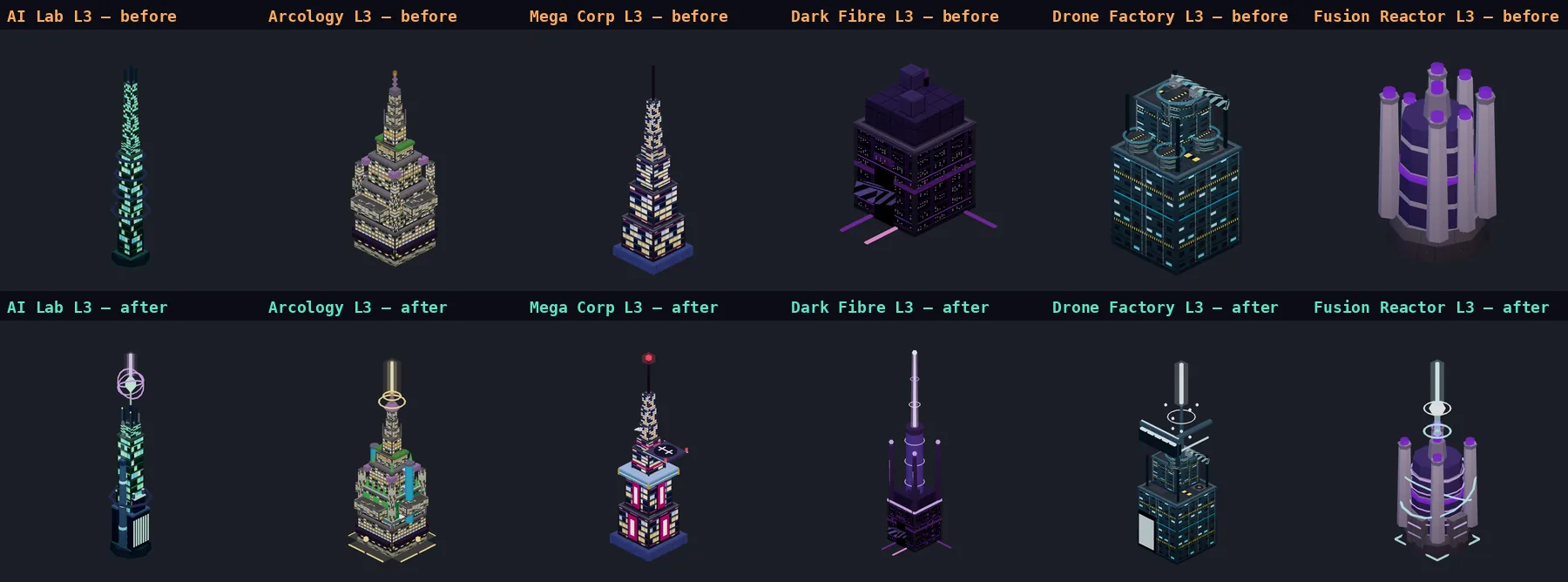
UPGRADE MAKEOVERS
Before and after renders of the top upgrade level of the AI Lab, Arcology, Mega Corp, Dark Fibre Array, Drone Factory and Fusion Reactor
Top upgrade level of six buildings: before (top) and after (bottom). Every building now changes at each level.
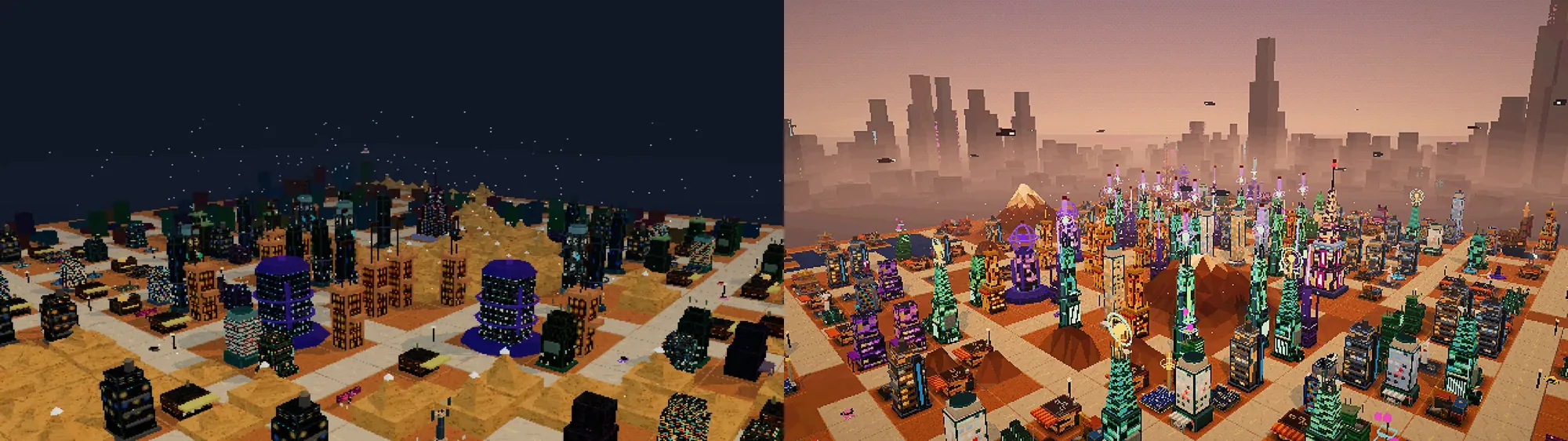
The same city before and after this release
The same kind of city, before (left) and after (right).
IMPROVEMENTS
  • Faction meters settle, and cards can't end your run — the three faction meters now ease back toward the middle, so a growing city no longer slides into a Corporate takeover or a Populist revolution just by getting big. An event card can push a meter to the edge but never over it, so a run ends because of how you built, not because of one card. Careful play should now win nearly every campaign, and ignoring a meter still loses. Side effect: building up Corporate standing for the Profit Machine goal takes more commercial buildings than before
  • Fairer starting plots — some worlds used to start you on a few scraps of buildable land. Your starting district now always has room to build. Existing saves are untouched
  • Clearer locked buildings — buildings you haven't unlocked are faded with a padlock and say what you need to unlock them
FIXES
  • Top bar hidden on iPad — installed as a Home Screen app in landscape, the top bar could slide out of view and leave a white gap at the bottom. The game now fits itself to the visible screen after rotating
  • Building details on iPad — tapping a building in the drawer could place it at once on an iPad with a keyboard or trackpad. The first tap now shows its details
  • Black building pictures — the 3D pictures in the Buildings drawer could stay black on a slow load. They now fill in as soon as the textures arrive
  • Accidental placements — tapping a map tile could place a random building from the tray that opened under your finger
  • Page zoom — pinching or double-tapping over a panel zoomed the whole page
  • Upgrade and Demolish reachable — they were hidden below the fold of the building panel on a landscape iPad
  • Wrong door direction label — the facing label was wrong for two of the four rotations
v0.1.5 2026-10-16 PATCH
FIXES
  • Music no longer cuts out — the soundtrack used to fade out into silence and creep back in every couple of minutes, so it sounded like it stopped and restarted. It now loops smoothly
  • Weather that works — Fog now really thickens the air and Rain falls as bright streaks. Both were doing nothing to the haze before
  • Windows follow the time of day — building windows are dark at noon and light up after dark. They had been stuck at whatever brightness they had when the building was placed
VISUALS
  • Gritty neon nights — nights are smoggy and dark, lit by sodium-orange street lamps and warm windows, with neon kept for the odd sign and tower rather than every building. Tall towers carry blinking red beacons, and the sky glows a dirty orange-red over the horizon
  • A megacity beyond the map — a hazy skyline of distant towers with lit windows and neon signs surrounds your city, with low-rise sprawl in front of it, so the edge of the map fades into the smog instead of cutting off
  • Warmer, less red dusk — sunsets now fade from amber to violet with a pink glow low on the skyline, instead of washing the whole city crimson
  • People on the streets — zoom in and citizens (a little bigger, so they read at normal zoom) walk the pavements, stop to watch the street, and come and go in the rain and the dark. Zoomed out, they stay out of the way
  • A city that moves — steam rises from kitchens, stalls, foundries and generators, neon pools on the streets buzz and flicker, hover traffic and delivery drones cruise over the rooftops (more of them after dark), and an advertising blimp circles the skyline with a glowing screen
  • Real skies — sunsets blaze orange into magenta and purple, midday is a teal smog, and the sun and moon are round discs with a glow
  • Sharper, still retro — the picture keeps its chunky low-res look but is crisper: pixels are now all the same size at any window size, there is no more speckle over the ground, and the colour is PlayStation-style 15-bit with a dithered sky. There is a new Glow & Grade switch in Settings to turn the effects off
INTERFACE
  • Faster building — tap an empty tile and the Buildings drawer opens for it; pick a building and it lands on the tile you tapped, ready to rotate and confirm
  • Food Stall upgrades that matter — upgrading a Food Stall now changes how it looks and what it does. Level 1 adds a second grill and a side cart (+1 credit per second), level 2 a rooftop terrace with lanterns and umbrellas (+2 population per second), and level 3 turns it into a glowing night-market hub with a neon arch (a little data, and the buildings next to it earn +10% like next to a shrine). The upgrade panel tells you what the next level gives
  • Hacker Den upgrades that matter — a server annex (+1 data per second), neon rings and floating glitch cubes (+3 credits per second), and finally a beam into the sky (more credits and data again), each level visibly changing the building
  • You can see the ground at night — empty land no longer disappears into black after dark; it gets a faint moonlit glow
  • A better Buildings drawer — buildings are grouped into tabs by what they do (Housing, Commerce, Data, Power, Network), shown as compact tiles with their real 3D model and price, with a detail panel for whichever one you point at. The panel for a building you have placed shows its 3D model too, at its current upgrade level
  • A proper map on the biome screen — the start screen shows each world's full terrain in colour with your starting plot marked, instead of a dark empty square
SOUND
  • The city has a sound — a low rumble of traffic and machinery fills the air and swells when you pull back, footsteps and a murmur of voices rise as you zoom in on the pavements, rain patters when it rains, and neon buzzes after dark. The mix follows the camera, the time of day and the weather, and it rides the Sound Effects switch in Settings
PERFORMANCE
  • Runs lighter — a mid-sized city needs roughly 3 to 5 times fewer draw operations per frame, which helps most on laptops and phones
v0.1.4 2026-10-15 PATCH
FIXES
  • No more stretched picture — the 3D view now matches your window. It was squashed on widescreen monitors and badly distorted when a phone was held upright
  • Windows are the same size on short and tall buildings, and the stray white speckles floating around buildings are gone
  • Clearer road rule — the first-building tip now says a building only produces when a road is within 2 tiles (it used to call roads a 20% bonus)
VISUALS
  • Readable nights — windows glow after dark and the whole city is lit well enough to see; dusk is less of a wall of red
  • Buildings sit on the ground with a soft shadow at their base and no longer read as black against the terrain
  • Every building redrawn — new facades with clear windows that light up at night, rooftop details, awnings, crates, tiled roofs and corrugated metal, plus plinths, cornices and glowing trim. The wind turbine, fusion reactor, solar array, plazas and parks were rebuilt or fixed
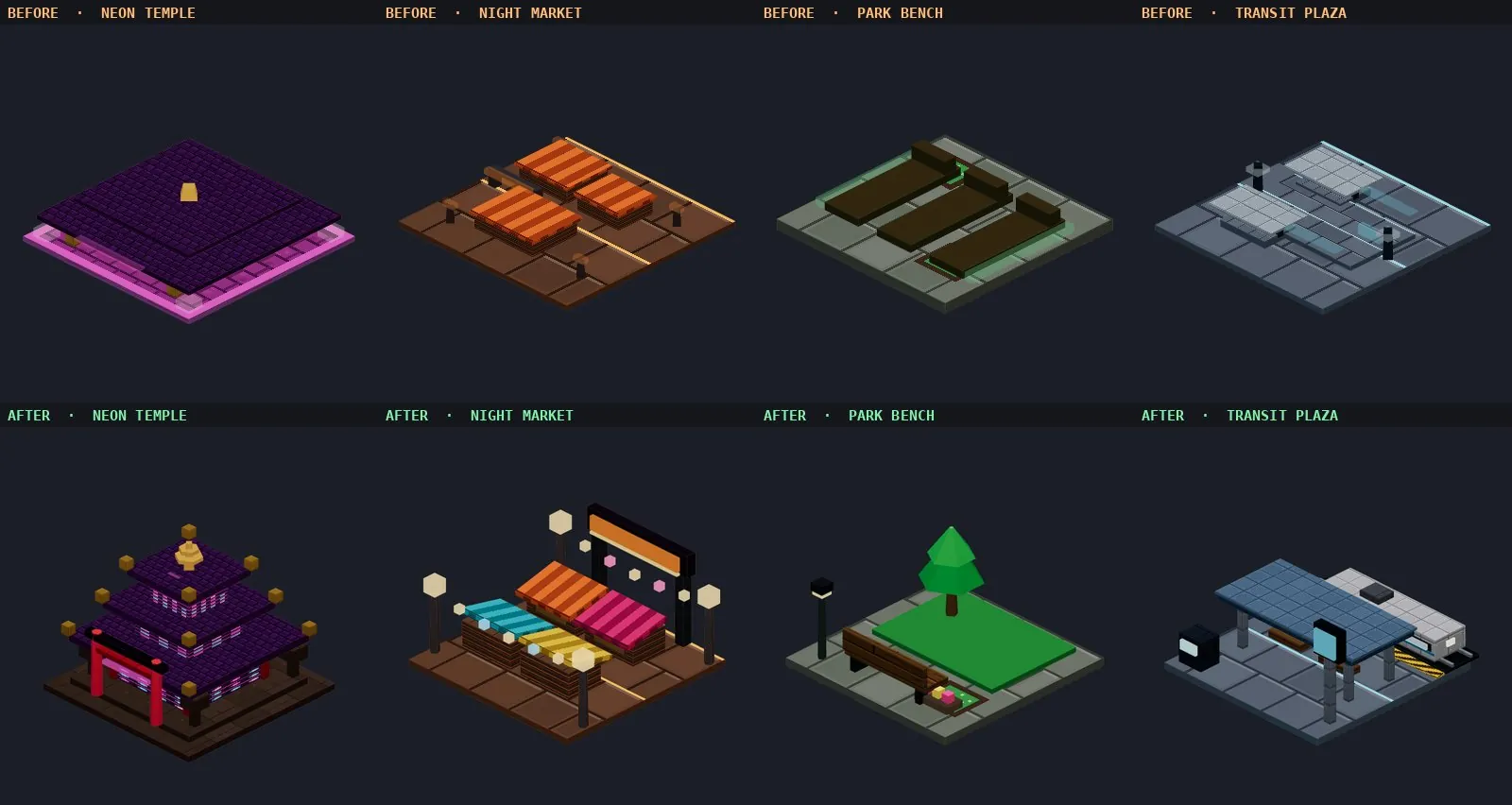
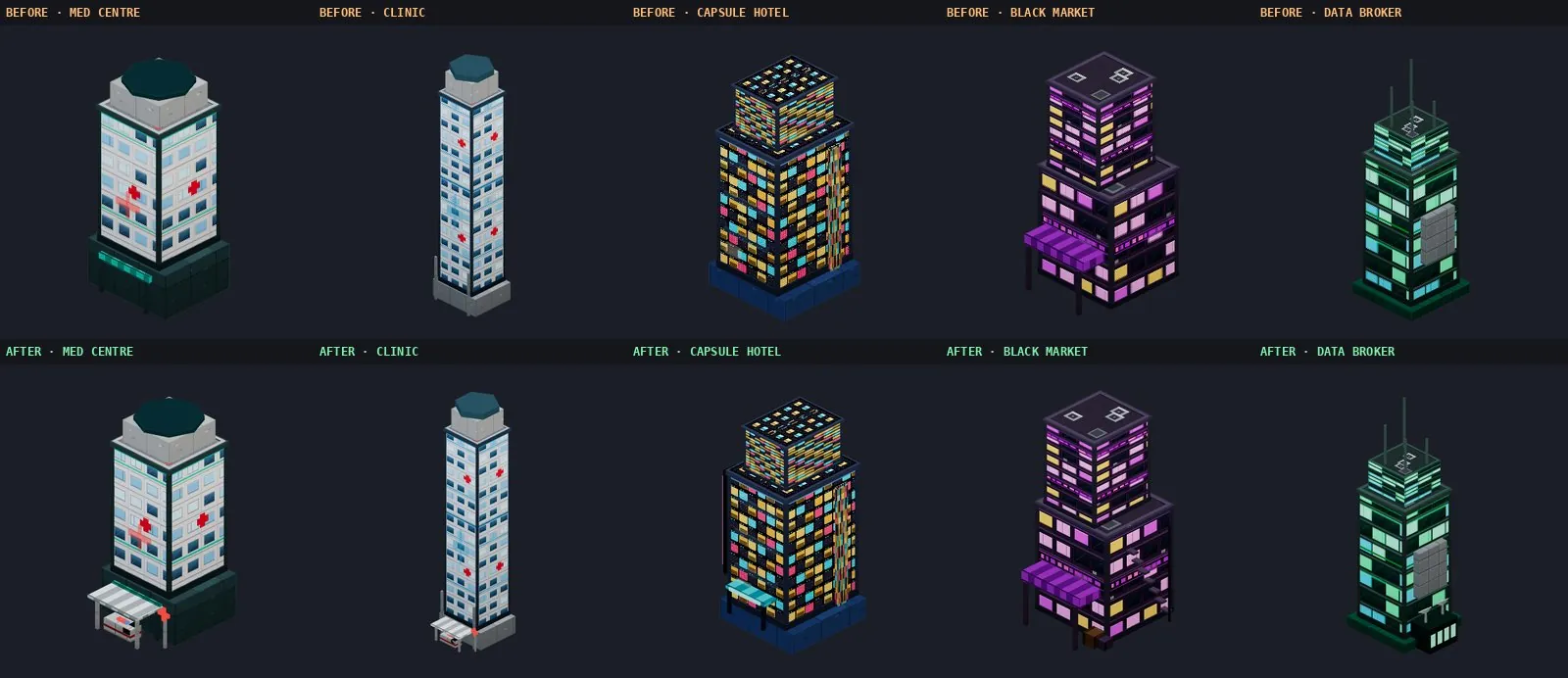
  • 25 buildings with new silhouettes — most of the roster no longer reads as plain boxes. Highlights: a gold-columned Casino, a Neon Temple pagoda with a torii gate, a Night Market with striped stalls and lantern chains, a scrapyard Junk Dealer with a crane, a Transit Plaza with a docked tram, a tilted-panel Solar Array, a round-towered Wind Turbine, and a Quantum Core crowned by orbiting rings. Plazas, parks and fountains gained trees, lamps and monuments. The Clinic and Medical Centre got an ambulance bay, the Capsule Hotel a neon entrance, the Black Market a fire escape and the Data Broker a server annex
  • Sound effects — UI taps, placing and finishing buildings, demolition, upgrades, roads, new districts, story cards, a siren when a disaster is announced and a crash when it hits. New Sound Effects switch in Settings
  • More traffic — seven kinds of vehicle now use the streets: cars, taxis, vans, buses, motorbikes, police cars and hovercars, each with its own shape. Faster ones queue behind slower ones, and unhappy citizens bring more police onto the streets
  • Real mountains — single faceted, snow-capped mountains with ridgelines, coloured to match each biome, instead of flat sandy mounds
BUILDING MAKEOVERS
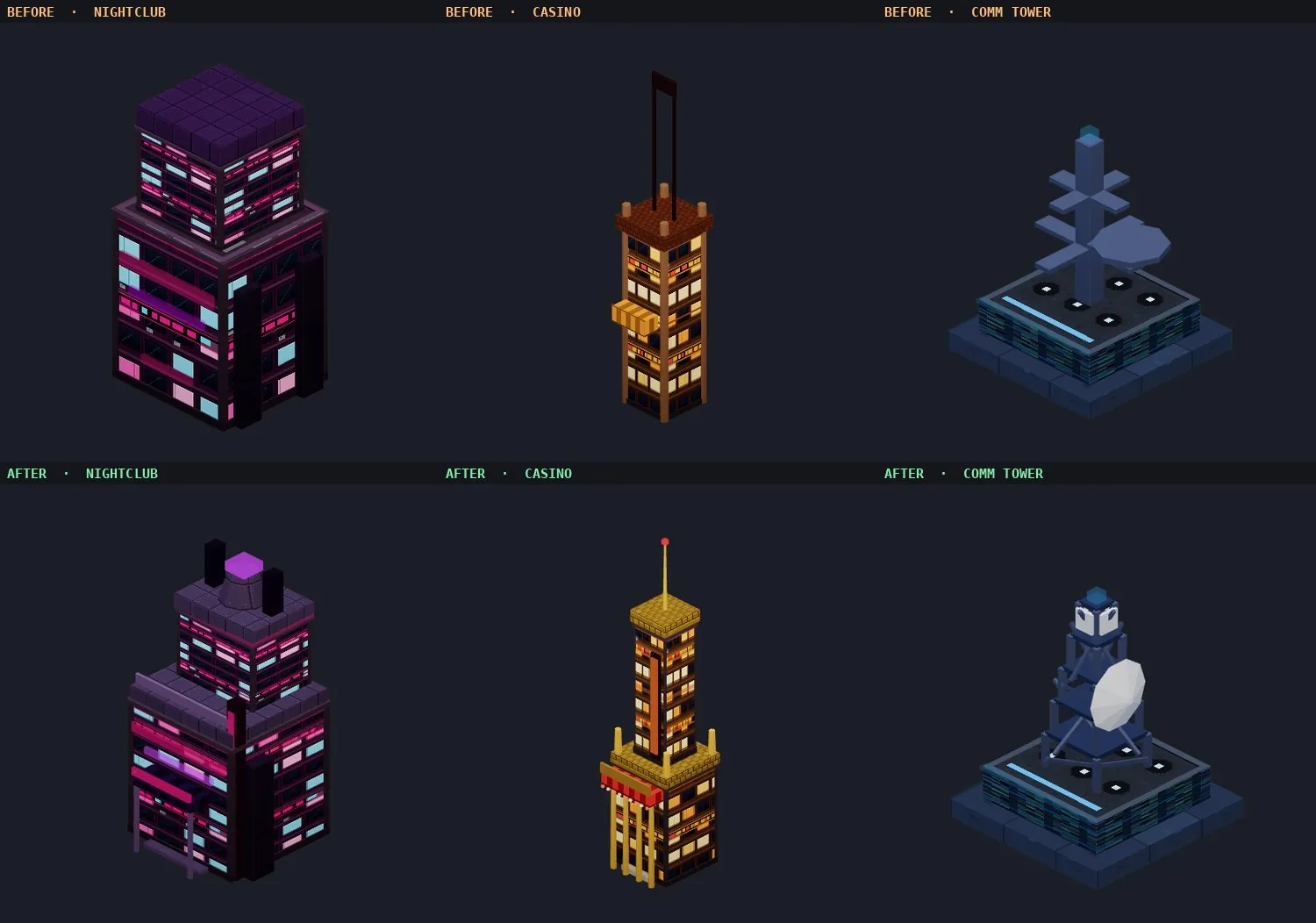
Before and after renders of the Nightclub, Casino and Comm Tower
Nightclub, Casino and Comm Tower: before (top) and after (bottom).
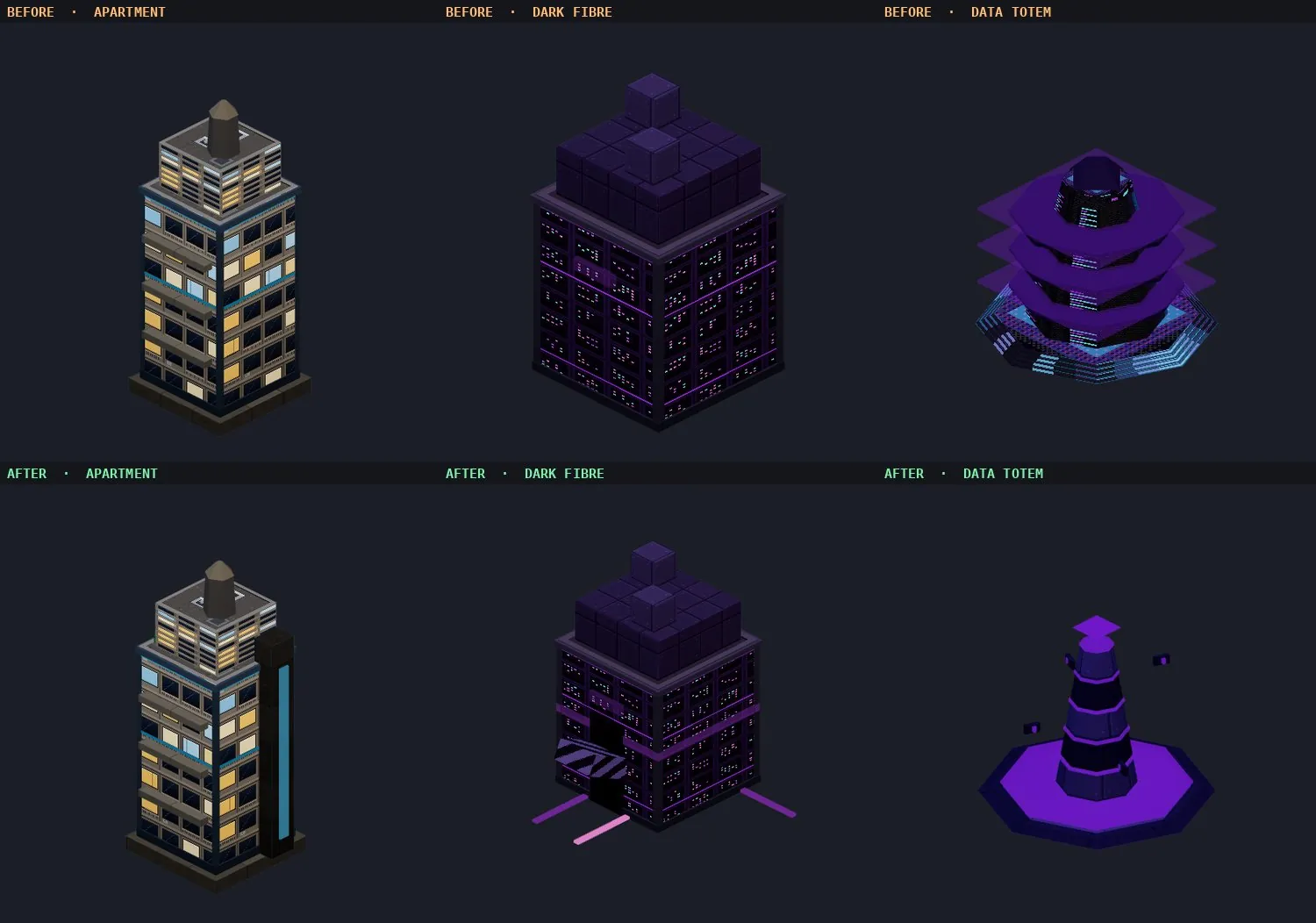
Before and after renders of the Apartment, Dark Fibre Hub and Data Totem
Apartment, Dark Fibre Hub and Data Totem: before (top) and after (bottom).
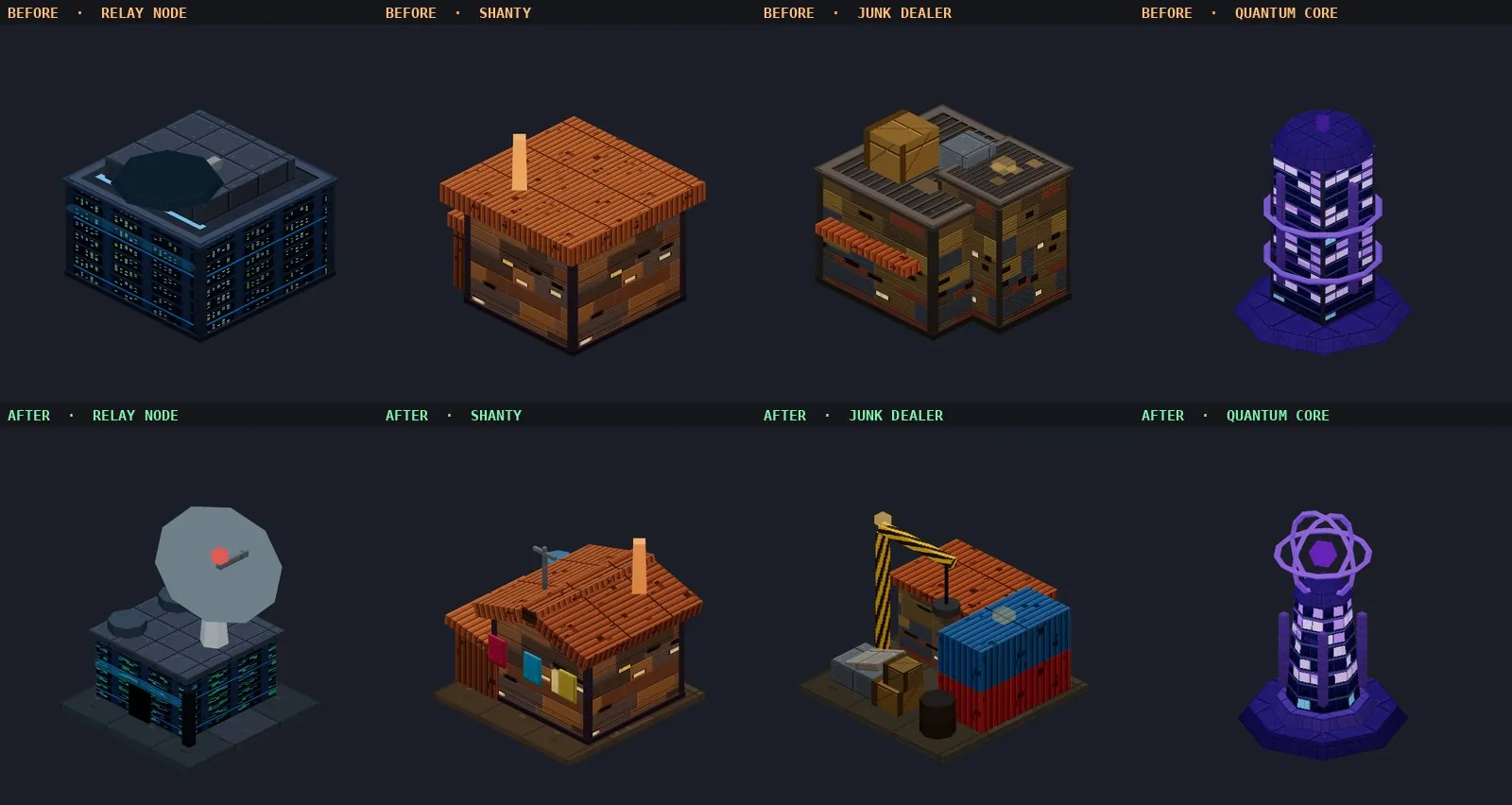
Before and after renders of the Relay Node, Shanty, Junk Dealer and Quantum Core
Relay Node, Shanty, Junk Dealer and Quantum Core: before (top) and after (bottom).
Before and after renders of the Neon Temple, Night Market, Park Bench and Transit Plaza
Neon Temple, Night Market, Park Bench and Transit Plaza: before (top) and after (bottom).
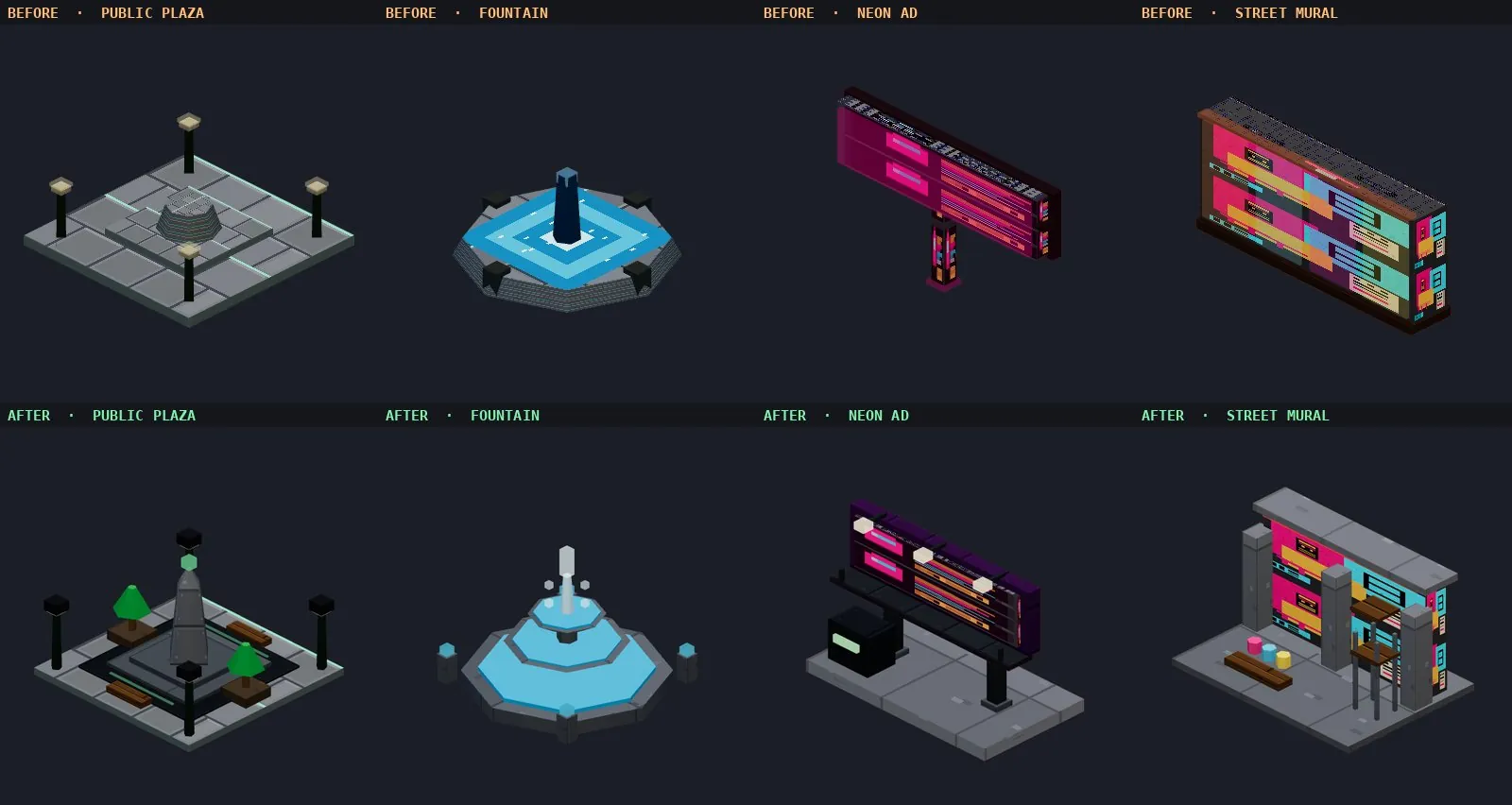
Before and after renders of the Public Plaza, Fountain, Neon Ad and Street Mural
Public Plaza, Fountain, Neon Ad and Street Mural: before (top) and after (bottom).
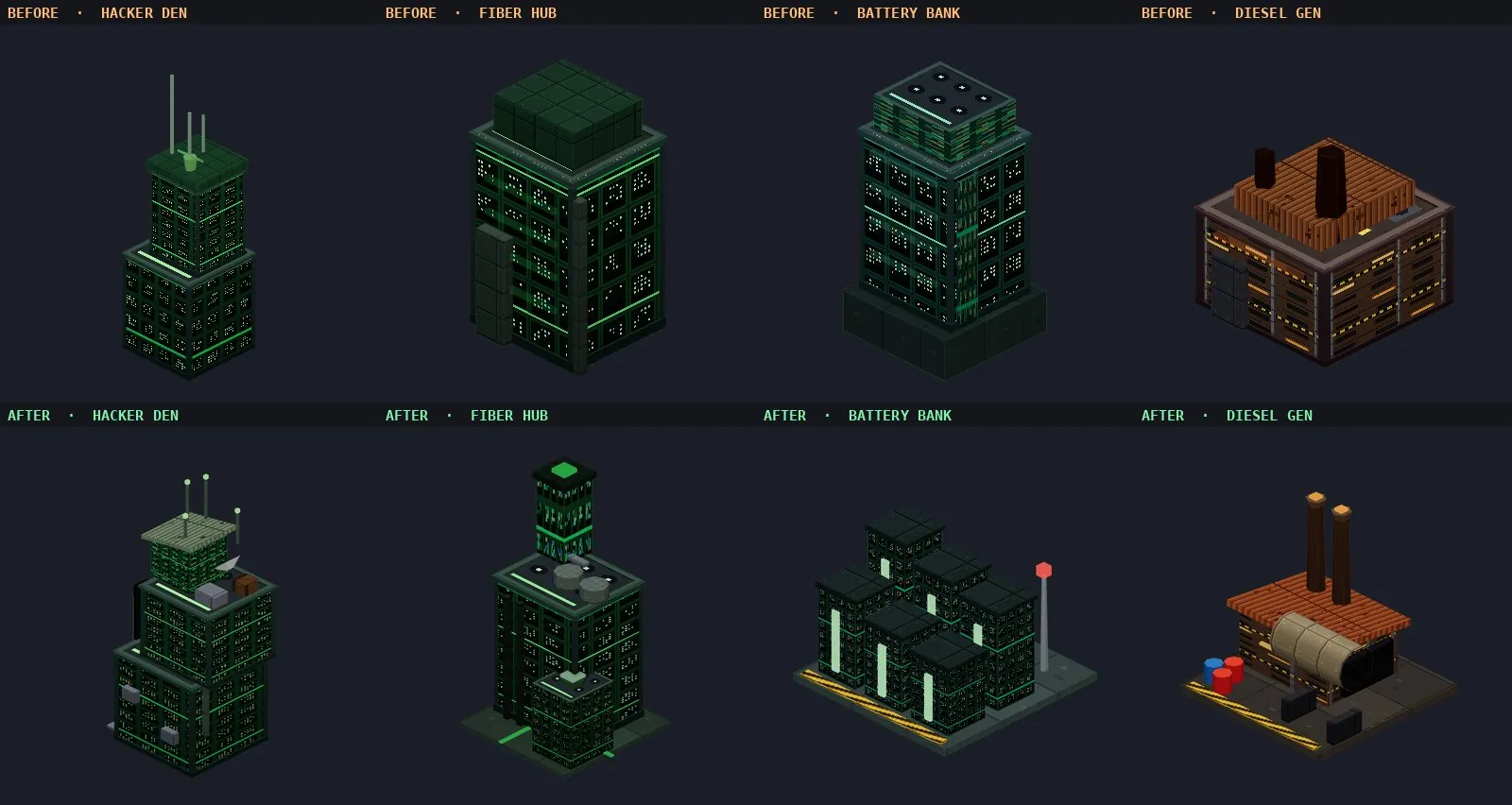
Before and after renders of the Hacker Den, Fiber Hub, Battery Bank and Diesel Generator
Hacker Den, Fiber Hub, Battery Bank and Diesel Generator: before (top) and after (bottom).
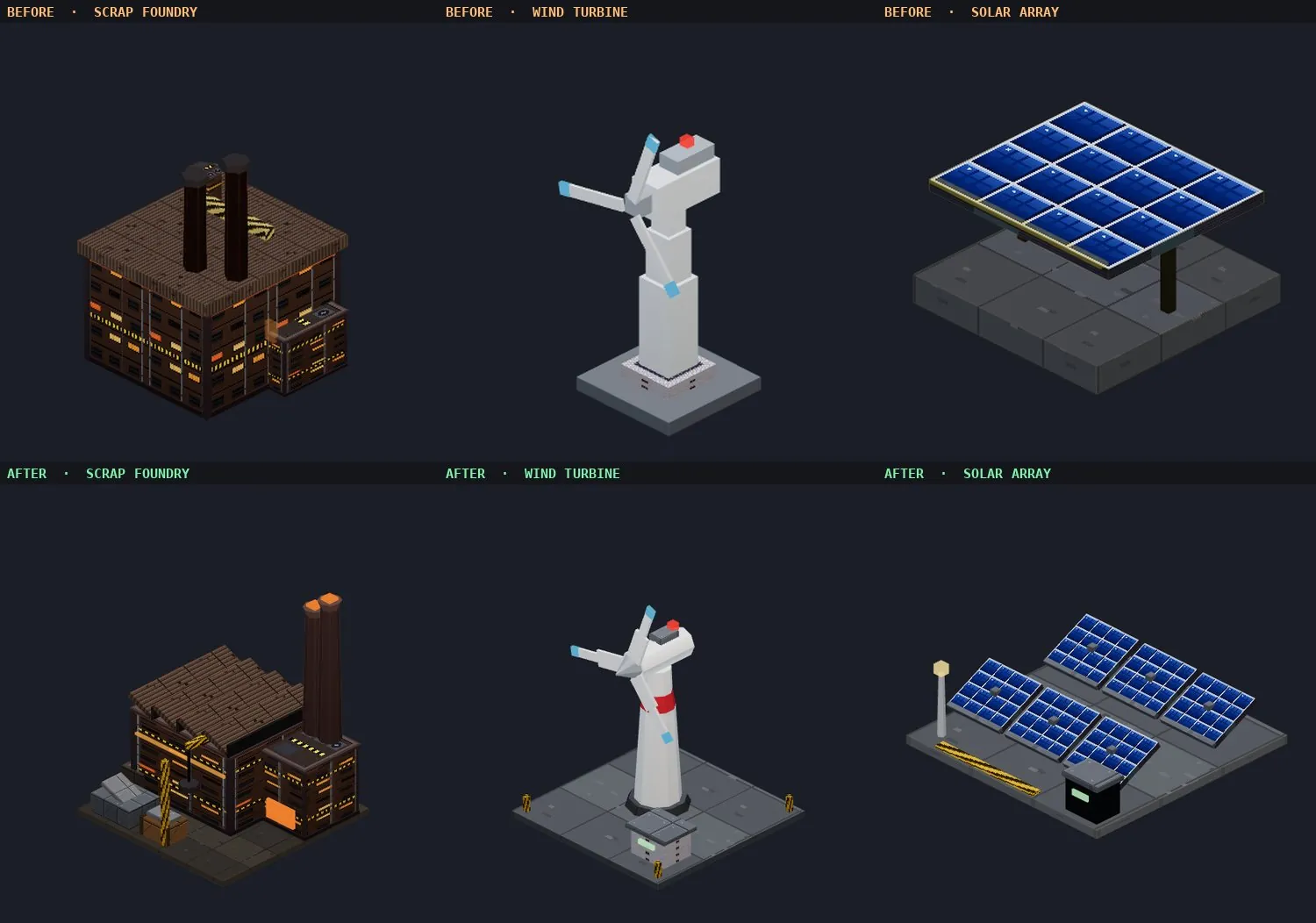
Before and after renders of the Scrap Foundry, Wind Turbine and Solar Array
Scrap Foundry, Wind Turbine and Solar Array: before (top) and after (bottom).
Before and after renders of the Medical Centre, Clinic, Capsule Hotel, Black Market and Data Broker
Medical Centre, Clinic, Capsule Hotel, Black Market and Data Broker: before (top) and after (bottom).
PERFORMANCE
  • Runs lighter — a mid-sized city needs roughly six times fewer draw operations per frame, so expect smoother play on weaker machines
MOBILE & UI
  • A more compact top bar on phones, camera buttons that no longer cover the Decor button, and a build menu that no longer hides behind the bottom bar
  • New cities open zoomed in on your land, and the home button returns there
v0.1.3 2026-10-07 PATCH
FIXES
  • Resetting your city now sticks — previously, if the game autosaved or you closed the tab while choosing a new map, your old city could come back
  • "No road access" warnings now show up in new cities — they were missing after starting a fresh city
  • Demolished or destroyed buildings no longer sometimes leave their model behind on the map
PERFORMANCE
  • Full 60 FPS on high-refresh screens — 144 Hz monitors were stuck at about 48 FPS
  • Moving the building preview around the map no longer causes slowdown
  • Building or removing roads next to lit buildings no longer causes a brief freeze
v0.1.2 2026-07-26 PATCH
TOUCH CONTROLS
  • Drag-to-place now works on touch — dragging your finger to aim a building preview used to get swallowed by camera panning; it now previews under your finger like it does with a mouse
  • New on-screen camera rotate buttons for touch devices, since two-finger pinch-rotate was unreliable — includes a one-tap recenter button too
MOBILE
  • The "desktop recommended" warning is smarter — it only shows on phone-sized screens now, since tablets have their own touch controls and don't need it
UI
  • Tidied up the building catalog cards — cost/income figures no longer repeat the same number in two places, and cards fit a bit more compactly on screen
v0.1.1 2026-05-27 PATCH
NOTIFICATIONS
  • Browser notifications — opt in to get desktop alerts when something important happens while you're in another tab: disasters, completed objectives, city events, and incoming story cards
  • The game asks for permission after your first event — not on page load — and notifications only fire when the tab is in the background, so you won't see duplicates
MOBILE
  • Added a warning for mobile and tablet players — the game is designed for desktop, but you can still jump in with a "Play Anyway" option
  • Improved the landing page layout on phones and tablets
  • Side panels and toasts now adapt to smaller screens
SCREENSHOTS
  • Version number and date now appear in the corner of every screenshot you share
v0.1.0 2026-05-26 INITIAL RELEASE
CITY BUILDING
  • 38 structures across 4 tiers — from Shanties and Noodle Bars up to the Arcology megastructure (one per city, the ultimate goal)
  • 6 categories: Residential, Commercial, Data, Power, Network, and Decoration
  • 3 upgrade levels per building to strengthen your city's output
  • Road network — connect your buildings with roads to boost income and watch live car traffic grow
  • District expansion — buy new land tiles to grow your city footprint
  • Aura buildings like shrines and plazas give nearby structures a production bonus
ECONOMY & INFRASTRUCTURE
  • Three resources: Credits, Population, and Data — each tracked live on your HUD
  • Power — every building draws power; build generators to cut grid costs
  • Staffing — residential buildings house workers that fuel commercial and data output
  • Bandwidth — network infrastructure is the bottleneck for your data production
  • Maintenance & insurance — keep your budget healthy; buy insurance to reduce disaster damage
FACTIONS & POLITICS
  • 3 factions — Corpos, Citizens, Syndicate — each with an approval meter you need to keep in balance
  • What you build shapes their mood: stack too many casinos and the Citizens will turn on you
  • 6 unique game-over scenarios — let any faction tip too far and it's over (Corporate Takeover, Syndicate Coup, Population Collapse, and more)
  • Watch for faction warnings before things spiral out of control
EVENTS & OBJECTIVES
  • 12 city events — grid overclocks, construction booms, data surges — that shake up your economy for a short window
  • 35 story cards — REIGNS-style two-choice dilemmas delivered by 10 named characters: fixers, corpo liaisons, underground hackers, and more
  • Active objectives — 3 rolling goals at a time with credit and data rewards for completion
  • Disasters — fires, earthquakes, and floods strike with a warning window to react
WORLD & VISUALS
  • 3 city biomes — Decayed, Corporate, Rebellion — each with a distinct look and feel
  • PS1-inspired 3D visuals with chunky pixels, scanlines, and CRT vignette
  • Dynamic day/night cycle — dawn amber fades to midday white and into midnight neon; windows and street lamps light up after dark
  • Live weather — Clear, Fog, and Rain with particle effects
  • Isometric camera with pan, rotate, and zoom via mouse or keyboard
SAVE & PERSISTENCE
  • Autosave every 30 seconds — your city is always safe
  • Export & import — download your save file and load it on any device
  • No account needed — free, browser-based, no install